
08May

Best Time Management Tips for Remote Workers…

Remote staffing has played its role in transforming the modern workplace. With millions of professionals now working from home. Or in hybrid setups. Or completely remote as virtual staff across different time zones. It’s evident that this flexibility offers freedom and convenience to both companies and talent looking for good opportunities. 

But at the same time, this unconventional working pattern also introduces challenges for remote workers.. They are related to productivity, focus, communication, and work-life balance.

Without proper structure, you, as a remote employee, can struggle with a lot. It includes distractions, burnout, missed deadlines, and inefficient workflows. 

That is why remote work time management has become one of the most important skills for you if you want to grow your career healthily and progressively!


Why Is Time Management Important for Remote Workers?

illustration image showing computer, watch, calendar, showing importance of remote working time management

As they operate without the traditional office environment, so, time management for remote workers is something that can naturally provide them with schedules, supervision, and structure.

The following are the reasons showing why time management for  remote workers is so important

1. Increased Productivity

Studies are evident that employees using time management strategies for remote work are more productive. They experience lower stress levels. Maintaining better job satisfaction…

According to a study, remote workers save an average of 72 minutes daily. YES! By avoiding commuting, focusing better on work than travel … Employees who follow organized schedules complete tasks faster and with better concentration. 

Stanford University research claims that a remote employee can be significantly more productive than office workers. Only if distractions are properly managed.

→ Effective remote working time management helps employees:

  • Prioritize important tasks.
  • Reduce procrastination.
  • Maintain consistent workflow.
  • Improve task completion rates.
  • Avoid multitasking overload.

2. Better Work-Life Balance

One major challenge in work-from-home time management is that there is usually a blurred boundary between personal and professional life, when pupils are working from theri living spaces. 

Remote workers often:

  • Work beyond office hours.
  • Skip breaks.
  • Respond to messages late at night.
  • Experience difficulty “switching off”.

→ If you follow effective time management tips for remote workers (given below), it will not only help establish healthier routines but also reduce your burnout.

3. Reduced Stress and Burnout

The APA (American Psychological Association) says that workload management and unclear boundaries are major contributors to workplace stress.

Organized remote workers’ experience:

  • Less anxiety.
  • Better mental clarity.
  • Improved energy levels.
  • Higher job satisfaction.
  • Greater emotional well-being.

4. Improved Team Collaboration

While working virtually, remote teams rely heavily on communication tools. Also, the shared schedules and accountability systems. 

Time management for remote workers ensures:

  • Timely responses.
  • Respect to be available only in committed hours.
  • Better meeting coordination..
  • Improved project completion.
  • Stronger collaboration across time zones.

What Are the Common Time Management Challenges in Remote Work?

Although remote work offers flexibility… but it also creates several productivity obstacles.

Common time management challenges you may face as a remote worker are:

1. Home Distractions

One of the biggest remote work productivity challenges is dealing with distractions such as:

  • Household chores.
  • Family interruptions.
  • Social media.
  • Television.
  • Mobile phones.

→ Unlike office environments, home settings may lack professional boundaries.

2. Lack of Structured Routine

Without commuting or office schedules, many remote workers struggle with:

  • Irregular sleep patterns.
  • Delayed work starts.
  • Poor task organization.
  • Inconsistent productivity.

→ A lack of routine often reduces efficiency.

3. Communication Overload

Remote employees often spend large portions of their day on:

  • Emails.
  • Instant messaging.
  • Video meetings.
  • Collaboration platforms.

Research from Microsoft indicates that excessive virtual meetings contribute to digital fatigue and reduced focus.

4. Procrastination

Remote work environments may increase procrastination due to reduced supervision. Employees may:

  • Delay difficult tasks.
  • Overuse breaks.
  • Become distracted online.
  • Lose track of priorities.

5. Difficulty Separating Work and Personal Life

Many remote employees continue working beyond office hours, causing:

  • Mental exhaustion.
  • Reduced family time.
  • Sleep disturbances.
  • Increased burnout risk.

Best Time Management Tips for Remote Workers!

You need to go for time management strategies for remote workers. The following are the effective ones and can significantly improve productivity, focus, and work-life balance.

→ Create a Dedicated Workspace

If you have a dedicated workspace, it will improve your concentration. Remember, for a healthy mind & mental health boundaries between work and personal life are very necessary!

Your workspace should ideally:

  • Be quiet!
  • Have good lighting…
  • Include ergonomic furniture.
  • Minimize distractions.
  • Support comfort and focus.

Employees working from organized workspaces often demonstrate improved productivity and reduced stress.

→ Set Clear Daily Goals

Start each day with defined objectives.

Use methods such as:

  • To-do lists.
  • Priority ranking.
  • Task batching.
  • Goal tracking apps.

Clear goals improve focus and reduce wasted time.

→ Use Time Blocking Techniques

Do you know that time blocking is one of the most effective time management strategies for remote work?

This technique involves assigning specific periods for:

  • Deep work.
  • Meetings..
  • Emails.
  • Breaks.
  • Administrative tasks.

For example:

  • 9 AM–11 AM: Focused project work
  • 11 AM–12 PM: Emails and communication
  • 1 PM–3 PM: Client tasks
  • 3 PM–3:30 PM: Team meetings

Time blocking reduces multitasking and improves concentration.

→ Follow the Pomodoro Technique

The Pomodoro Technique is a time management method, very effective for work from home remote workers!

It helps maintain productivity by dividing work into intervals.

Example of typical structure:

  • 25 minutes of focused work.
  • 5-minute break.
  • Longer break after four cycles.

Benefits of the Pomodoro technique include:

  • Reduced mental fatigue.
  • Better concentration.
  • Improved motivation.
  • Increased task completion.

→ Prioritize Important Tasks First

Use prioritization frameworks such as:

  1. Eisenhower Matrix: Helps categorize your tasks. This categorization is based on urgency and importance… so you can focus on high-priority work first. 
  2. ABC prioritization: The ABC method helps you organize your tasks into AB & C… where A tells the most important tasks, B categorizes moderately important tasks, and C for least important… This is very helpful to let you follow categories for better workflow management. 
  3. Pareto Principle (80/20 rule): It is a famous rule that suggests that 80% of the required tasks are completed or work results. As it comes from 20% of your most impactful tasks. So follow 80/20 rule. Prioritize those key activities first. At the end of the day, you will be relaxed that the most important tasks are already taken care of, instead of the least impactful ones. 

In simple words, remote working time management should be focused on high-impact tasks during peak productivity hours.

→ Limit Multitasking

Research shows that multitasking reduces efficiency and increases errors.

Instead:

  • Complete one task at a time.
  • Minimize open tabs.
  • Turn off unnecessary notifications.
  • Avoid constant context switching.

Focused work improves quality and speed.

→ Schedule Regular Breaks

Do you break is essential for maintaining energy and concentration. Instead, reward yourself with a bite of chocolate or something you enjoy to entertain with the completion of a task, and take a break after that.

Short breaks help:

  • Improve creativity.
  • Reduce eye strain.
  • Prevent fatigue.
  • Enhance mental performance.

Experts recommend:

  • Stretching regularly.
  • Walking briefly after a minimum of 30 minutes of work.
  • Staying hydrated.
  • Avoid continuous screen exposure.

→ Manage Notifications and Digital Distractions

Digital interruptions are major productivity killers.

Helpful strategies include:

  • Turning off nonessential notifications.
  • Using “Do Not Disturb” mode.
  • Checking emails at scheduled times.
  • Blocking distracting websites during focus sessions.

→ Use Productivity and Time Management Tools

Technology can significantly improve remote work time management.

Popular tools include:

Tool Purpose
Trello Task management
Asana Team collaboration
Notion Notes and organization
Slack Team communication
RescueTime Productivity tracking
Clockify Time monitoring

These tools help remote workers stay organized and accountable.

→ Establish Work-Life Boundaries

One of the most important effective time management tips is learning when to stop working.

Helpful boundary-setting strategies include:

  • Fixed work hours.
  • End-of-day routines.
  • Separate work devices.
  • Avoiding late-night emails.
  • Logging out after work.

Healthy boundaries reduce burnout and improve mental health.

→ Plan the Next Day Before Logging Off

Ending your workday with preparation improves morning productivity.

Spend 10–15 minutes:

  • Reviewing completed work.
  • Listing priorities for tomorrow.
  • Organizing files.
  • Clearing your workspace.

This creates a smoother start the next day.


How Employers Can Support Remote Worker Time Management? 

Employers play a major role in helping remote employees stay productive and balanced.

1. Encourage Flexible Scheduling

Employees work best during different hours. 

Flexible schedules can improve productivity. Also promotes job satisfaction. Employers can have better employee retention if they allow flexible work scheduling because with this employee can have a better work-life balance.

2. Reduce Unnecessary Meetings

Too many virtual meetings reduce deep work time.

Employers should:

  • Keep meetings concise.
  • Use asynchronous communication when possible.
  • Set meeting-free focus periods.

3. Provide Productivity Tools

If an organization should invest in collaboration software, time tracking tools. Also, the project management systems and better official communication platforms. They, with these tools, can improve workflow transparency and accountability for remote workers.

4. Promote Mental Health and Wellness

Remote workers may experience isolation or burnout.

Employers can help through:

  • Wellness programs.
  • Mental health resources.
  • Encouraging breaks.
  • Respecting work hours.

5. Set Clear Expectations

Clear expectations reduce confusion and improve efficiency.

Managers should properly communicate:

  • Deadlines.
  • Goals.
  • Performance metrics.
  • Availability requirements.

Benefits of Effective Time Management for Remote Teams!

Remote working time management is not only for remote worker but equally beneficial for employers hiring remote staffing for their businesses. 

→ Benefits for Employees illustration image showing computer, watch, calendar, showing importance of remote working time management

Employees who master it & follow remote work time management often experience:

  • Higher productivity.
  • Reduced stress.
  • Better focus.
  • Improved job satisfaction.
  • Healthier work-life balance.
  • Greater career growth opportunities.

→ Benefits for Employers

sales development representative speaking with client to understand business needs and qualify lead

Organizations promoting work-from-home time management for remote workers benefit through:

  • Increased team efficiency.
  • Better project completion rates.
  • Reduced employee burnout.
  • Higher retention rates.
  • Improved collaboration.
  • Greater profitability…

Future of Remote Work and Time Management…

illustration image showing computer, watch, calendar, showing importance of remote working time managementRemote and hybrid work models continue to grow globally. According to workplace studies, flexible work arrangements are now considered a priority by all. Including healthcare providers, big & small sizes of practices, wellness centers, hospitality businesses, law firms, and big companies or start-ups….

As remote work expands, employees who develop strong time management skills will likely experience:

  • Better productivity.
  • Greater flexibility.
  • Improved career advancement.
  • Cost-effectiveness with more remote hirings.
  • Enhanced professional independence.

Companies that support healthy remote work practices may also achieve stronger employee engagement and operational success.


Bottom Line!

Remote work offers flexibility, freedom, and convenience… but it can’t be done without discipline and organization. Effective work-from-home time management is essential for maintaining productivity, reducing distractions, and protecting mental well-being.


Get Hired with Health & Virtuals!

What are your skills and specialties? Are you a healthcare professional? Or an executive assistant? Do you specialize in RCM & medical billing? You are a customer support specialist, SDR, or administrative expert ?

Health & Virtuals helps skilled professionals connect with leading US-based companies and healthcare organizations.

We don’t just hire virtual assistants… we train, certify, support, and deploy remote professionals in our certified digital training school, according to US business workplace and healthcare standards, including HIPAA compliance, EMR/EHR systems, communication training, and professional workflow management.

a group of people working at officeWe Train & Deploy:

If you have a suitable qualification and interest, and if you are ready to build a remote career with international opportunities, we can help you! Become a job-ready remote worker with us!

Join our global talent network today!


FAQs

Why is time management essential for remote workers?

Time management helps remote workers stay productive. They should be organized and focused. With remote working time management, they can! While reducing stress and maintaining a healthy work-life balance.

What are the biggest remote work productivity challenges?

Common challenges include distractions at home. Procrastination & communication overload are also among the biggest challenges. Others are a lack of structure and difficulty separating work from personal life.

What tools help remote workers manage time?

Popular tools include Trello, Asana, Google Calendar, Notion, and Clockify.

04May

Cost of Onboarding a New Employee & How to Reduce It?

Onboarding of employees is no longer a mere orientation. It is a multi-level investment, which is organized and has a direct effect on productivity, retention, and business performance in the long run. However, although it is an important aspect, most organizations do not optimize or measure the costs of onboarding.

Despite its critical role in building strong, efficient teams, many businesses still fail to measure or optimize onboarding expenses. This lack of clarity can lead to unnecessary spending, slower ramp-up times, and reduced overall ROI on new hires. 


How Much Does It Cost to Onboard a New Employee?

orientation concept illustrating introduction to company culture policies ,hiring cot and employee costOnboarding cost is the total of all onboarding expenses that are incurred to acclimate a new employee into an organization until he or she becomes fully productive.

There are wide industry standards that can be determined by the size of a company and the complexity of its roles. The cost of onboarding is about 4,000 USD on average per employee, according to data provided by SHRM. Nonetheless, this figure usually indicates direct expenses only.

Considering broader factors:

This broad spectrum points to an important aspect: the employee cost is not a constant, but it grows with the complexity, industry & process efficiency.


What are the Stages of Onboarding Employees?

employee onboarding cost concept with icons representing hiring training productivity, onboarding expenses, staffing efficiency and business expenses

Onboarding is a process and not an event, as it involves many stages and costs are involved in every stage.

→ Preboarding

This phase starts once the offer is accepted, and involves documentation, communication and system setup. Although it might look administrative, time wastage in this case can cause inefficiencies in the future, which add time and cost.

→ Orientation

Orientation will familiarize the employees with company policies, culture and expectations. It is more resource-intensive than it seems since it is usually the work of HR teams and leadership.

→ Role Integration and Training

The stage is the most expensive. Workers have to study tools, work processes, and duties. In the process their productivity is minimal as the experienced team members spend time in mentoring and overseeing.

→ Performance Ramp-Up

Employees need time to achieve optimal productivity even after initial training. Gallup states that a small percentage of employees strongly believe that their organization is doing a great job at onboarding, indicating that many organizations do not maximize this process.


Cost Breakdown of Onboarding a New Employee 

Cost Component What It Includes Impact on Business
Recruitment Costs Job ads, recruiter fees, interviews, screening High upfront hiring expense
Training Costs Orientation, training sessions, learning materials Time + resource intensive
Manager & HR Time Supervising, onboarding support, follow-ups Reduces productivity of senior staff
Tools & Software Setup Licenses, systems, accounts, hardware One-time + recurring costs
Productivity Loss Reduced output during learning phase Hidden but significant cost
Administrative Overhead Documentation, compliance, onboarding paperwork Ongoing HR workload
Turnover-Related Costs Rehiring if employee leaves early Increases long-term hiring expenses

How to Calculate Onboarding Costs?

Businesses should incorporate direct and indirect elements to compute onboarding costs.

Basic Formula:

The Cost of Onboarding = Direct Costs + Indirect Costs.

→ Direct Costs include:

  • HR salaries and time of administration.
  • Training programs and software.
  • Space and equipment set up.

→ Indirect Costs include:

  • Manager and team time.
  • Wastage of productivity in ramp-up.
  • Mistakes and re-work of untrained workers.

In fact, the involvement of a manager’s time alone can cost $4,000-12,000 per hire.


Onboarding Cost vs Cost-per-Hire

concept image og a company saying we are hiring

Onboarding cost and cost-per-hire are used interchangeably, but they are two measures of the hiring process.

  1. Cost-per-hire encompasses the costs incurred during the attraction and recruitment process of candidates, including advertising, recruiter fees, and interview time. 
  2. Onboarding cost starts once hired and deals with integration and productivity.

This difference is significant since a decreased cost of recruitment does not necessarily lead to a general reduction in costs. In case onboarding is not efficient, the organization can lose even more money due to low productivity or early turnover.

When both metrics are considered, it will be a clearer picture of the amount of investment that will be needed to attract and retain talent.


Why Is Onboarding So Expensive?

Illustration of Healthcare virtual assistant managing patient appointments and medical scheduling system

Onboarding is costly as it involves a combination of cost drivers throughout the organization.

1. Productivity Gap

New workers require time to achieve maximum efficiency. The output is reduced during this period and this has a direct effect on the performance of the business.

2. Resource Allocation

Training and supporting new employees consumes a lot of time for the managers and team members. This causes a diversion of main duties and constitutes opportunity costs.

3. Tools and Infrastructure

Making systems, software and equipment available contributes to onboarding costs, particularly in larger organizations.

4. Early Turnover Risk

The high turnover rate among employees is caused by poor onboarding experiences, resulting in a significant percentage of turnover within the first few months. Research has shown that as many as 20 percent of the turnover is during the first 45 days.


Onboarding’s Hidden Costs

In addition to the apparent cost of recruiting, onboarding has a number of hidden costs that have a great effect on budgets.

→ Lost Productivity: Employees can also take months to be fully operational, postponing ROI.

→ Managerial Bandwidth: Old employees lose time for strategic work in order to accommodate the new recruits.

Cultural Misalignment: Ineffective onboarding may result in a lack of engagement and performance.

Early Turnover: It can cost 16%-20% of the salary of an employee to replace an employee.

Manual Processes Inefficiencies: Delays in administration and irregular workflow raise the costs of operation.

This can be attributed to these latent factors, which may consume 60-70 percent of the overall hiring and onboarding cost breakdown.


Best Ways to Bring Down Onboarding Costs Without Cutting Corners

HR team training a new employee during onboarding session in corporate office environment

Cost of onboarding reduction is not a matter of under-investment but rather efficiency and waste reduction.

→ Standardization 

Standardization is one of the most effective methods. With a well-defined and well-implemented onboarding process, organizations minimize variability and prevent avoidable delays. 

The same support is provided to employees and teams do not take as much time to reinvent workflows.

→ Automation

Automation is also a very important factor. Digital tools can help in streamlining such administrative tasks as document collection, system provisioning, and scheduling. This saves on manual work and enables the HR teams to concentrate on more strategic tasks.

→ Preboarding

Preboarding is another important aspect. It is better to engage employees before the first day so that they can begin with clarity and confidence. It reduces the time of adjustment and enhances productivity.

→ Structured Training Programs

Also relevant will be investing in structured training programs. Although it might appear as an extra expense, in many cases, cost of training employees saves on costs in the long-term by enhancing efficiency and decreasing mistakes. 

According to research, successful onboarding can enhance employee retention (up to 82) and productivity (over 70).

This is not about saving money, but being smarter with the money.


How Does Virtual Staffing Reduce Onboarding Costs?

Chiropractic patient receiving follow-up reminder call from virtual assistant

Remote working has also provided new avenues to save on hiring costs. The model of virtual staffing is more flexible and cost-efficient, in particular.

Among the short-term benefits of remote hiring are the decrease in infrastructure costs. Businesses no longer have to spend a lot of money on physical office space, equipment, or utilities for each new employee.

Onboarding processes are also more easily scalable because they’re virtual. Digital tools allow organisations to hire several employees at a time without a huge increase in expenses. 

It is possible to standardize training materials and deliver them online, avoiding repetitive manual training to increase staffing efficiency.


What Do Businesses Gain by Reducing Onboarding Costs?

The benefits of managing the average cost of onboarding a new employee go much beyond short-term savings. This enhances business efficiency because lean processes help reduce delays and wastage of resources within a business.

Another significant benefit is quicker time-to-productivity. Onboarded employees can start contributing value sooner, which enhances the overall return on investment.

Retention also improves. When an onboarding experience is well organized, it will establish a closer bond between the employees and the organization, which will lower the chances of employees leaving their jobs prematurely.

Finally, the cutting of onboarding expenses is not simply a financial affair. It is a strategic step that enhances the performance of the workforce and helps to contribute to the long-term development.


Conclusion

One of the least considered business costs and performance drivers is onboarding. Although it might seem to be a run-of-the-mill procedure, its effect is directly related to productivity, retention, and profitability.

Companies that invest time to learn and streamline onboarding expenses are set to grow in the long term. Standardization of processes, capitalizing on technology and paying attention to employee experience can help businesses save a lot of money without compromising.

Do you want to cut your onboarding cost? It is time to review your organization’s strategy of onboarding. 


With Health & Virtuals, you gain access to fully trained, pre-vetted remote professionals trained in our U.S standard digital training institute who are ready to integrate seamlessly into your workflow from day one. 

No long training curves, no excessive HR workload, and no productivity compromises & delays.

Our virtual talent is equipped to step in immediately… helping you reduce onboarding expenses, eliminate inefficiencies, and improve operational output from the very start.

Build stronger teams faster, scale smarter, choose the right VA for your business, and improve ROI with virtual hiring instantly with Health & Virtuals — where trained remote professionals are ready when you are…

Contact Now, for more details!
28Apr

How to Avoid Burnout While Working Remotely!

Remote work was once seen as the ultimate upgrade. No commute. Flexible hours. More control.

But it is way more complex than that in the practical world.

Recent workplace burnout statistics show a sharp rise in both: work burnout and employee burnout. Specially among remote professionals. 

According to global workforce studies:

  • Over 70% of employees report experiencing burnout at some point.
  • Remote workers are more likely to work longer hours than office-based employees.
  • Nearly 1 in 2 remote employees say they struggle to disconnect… after work.

When flexibility offered by remote work comes without boundaries… it often turns into constant availability. And that’s where workplace burnout begins to take hold.


What Is Remote Work Burnout?

Remote worker feeling stressed and overwhelmed while working from home showing signs of burnout

When you are a remote worker. And you start feeling chronic physical and emotional exhaustion. You are in this state, caused by prolonged work stress in your remote setting. It is your “remote work burnout.

If you are assuming that you are just being tired. You are wrong!

It is deeper. More persistent. It typically includes:

  • Mental fatigue. That doesn’t improve with rest.
  • Reduced productivity. Despite longer working hours.
  • Emotional detachment from work..

It is different from traditional work burnout; remote burnout often hides behind productivity. You may still be completing tasks. But at a higher personal cost.


Common Signs of Burnout

Burnout builds gradually. It rarely announces itself clearly. Common signs of work burnout may include all or a few of these:

1. Physical SignsTired professional rubbing eyes with fatigue while working on computer at home

  • Constant fatigue.
  • Sleep disturbances.
  • Headaches or muscle tension.
  • Tired face & body.

2. Emotional Signs

  • Irritability.
  • Lack of motivation.
  • Lack of excitement you once felt with your work.
  • Simple tasks become overwhelming to you.

3. Behavioral Signs

  • You are working longer. But achieving less!
  • Avoiding meetings or communication.
  • Procrastination or disengagement.

These signs are consistent across employee burnout research globally.


How Does Remote Work Burnout Impact Businesses?

billing errors can be reduced by hiring virtual payroll assistant

Burnout is not just an individual struggle of a worker. The problem is it is a measurable risk to the business around. 

When work burnout and employee burnout go unaddressed, the consequences ripple. It can cost your productivity, culture, and profitability.

→ Reduced Productivity and Output Quality

Burnout directly weakens cognitive performance. Employees who are mentally exhausted struggle with focus, creativity, and decision-making.

Research indicates that burned-out employees are the ones who take sick leave. The percentage of such workers is up to 63%. They are significantly less productive when they are working. 

In remote settings, this often appears as:

  • Longer time to complete tasks.
  • Reduced innovation and problem-solving ability.
  • Presenteeism”. Being online but not fully functioning…

It is a silent productivity loss. Becomes more costly than absenteeism.

→ Higher Turnover and Talent Loss

One of the most expensive outcomes of workplace burnout is employee attrition.

Employees experiencing chronic stress are far more likely to:

  • Seek new job opportunities.
  • Resign without long transition periods.
  • Disengage before leaving.

High turnover disrupts team dynamics, delays projects, and increases recruitment costs. Thus making burnout a direct financial liability.

→ Lower Engagement and Organizational Commitment

Burnout leaves a worker with NO emotional connection to work. It is worse than an employees who once felt motivated begin to detach.

This leads to:

  • Minimal participation in meetings.
  • Lack of initiative.
  • Reduced collaboration.

While in remote jobs, the engagement of workers is already required to make an intentional effort. Their burnout accelerates disconnection. Your tired employees stop aligning with company goals. Thus, performance becomes purely transactional.

→ Increased Errors and Operational Risk

It is obvious that fatigue and an overloaded mind can significantly make more mistakes.

In high-responsibility roles, such as healthcare, finance, or technical operations, this can result in:

  • Costly errors.
  • Compliance issues.
  • Client dissatisfaction.

→ Strain on Team Dynamics and Leadership

Burnout does not stay isolated. It spreads.

When one team member is overwhelmed, others have to deal with an additional workload. Team morale declines. And ultimately, managers spend more time resolving issues. Instead of driving growth.

→ Increased Healthcare and Absenteeism Costs

Burnout is strongly linked to physical and mental health conditions. Including anxiety, depression, and sleep disorders.

For businesses, it means:

  • Higher healthcare claims.
  • Increased sick days.
  • Reduced long-term workforce stability.

From a business perspective, burnout is not just an HR issue… it is an operational and financial challenge.

It reduces efficiency, increases costs, and weakens organizational culture.

Modern companies are beginning to recognize that workplace burnout prevention is not optional. It is a strategic investment.


Why Remote Workers Experience Burnout More Often?

Exhausted remote employee sitting at laptop with tired expression and low energy

Remote work introduces unique stressors that accelerate burnout.

1. Blurred Work-Life Boundaries

When your home becomes your office, “logging off” becomes harder.

2. Always-On Culture

Notifications. Messages. Emails. There is a constant digital presence.

3. Isolation

Lack of social interaction reduces emotional support and collaboration.

4. Overcompensation

Remote employees often work harder to “prove” productivity.

5. Lack of Structure

No defined schedules? Your work expands into personal time. Making you feel overwhelmed and disturbing your work-life balance.

These factors collectively increase the risk of work burnout in remote settings.


Ways to Avoid Burnout While Working Remotely!

Employee buried in papers struggling with productivity and focus while working remotely on laptop

Preventing burnout requires intentional habits. Not just motivation, it needs structure.

As a remote candidate, you should:

1. Set Clear Work Boundaries

Define start and end times. Stick to them. Avoid checking emails many times, outside work hours.

2. Create a Dedicated Workspace

Create a small home office space. Even a small desk can create psychological separation between work and home.

3. Follow the “Deep Work + Break” Model

Work in focused blocks (60 to 90 minutes). Then take short breaks. It will train your mind to be distant from work hours.

4. Prioritize Tasks, Not Hours

Focus on outcomes instead of time spent online.

5. Schedule Social Interaction

Regular check-ins with colleagues reduce isolation. It will increase your sense of engagement and let you enjoy your off-duty hours.

6. Take Time Off. Seriously!

Many remote workers skip vacations. They assume that if working remotely, they should be available when called. It is wrong and accelerates your employee burnout. Take your off-time, as an off-time!

7. Practice Digital Detox

After your duty hours, turn off non-essential notifications. Limit after-hours communication.

8. Invest in Mental Health

Your mental health is important! Mindfulness, exercise, or even short daily walks can significantly reduce stress levels.

These strategies are essential components of workplace burnout prevention; a remote worker should be aware of them!


How a Staffing Agency Can Help Reduce Burnout

Happy remote worker enjoying balanced work life after avoiding burnout

Planning to work remotely? Take the first step correctly. Always start by choosing the right and most suitable environment for you.

You can connect with job recruiters or a remote staffing company. A good staffing agency helps you get a job. Not only do they know the talent pool, but also the company recruiting the candidate. 

They can play a critical role in reducing burnout. How?

  • By matching candidates with roles that align with their workload capacity.
  • By offering flexible remote opportunities. But with healthier expectations.
  • By providing access to companies with strong work-life balance cultures.
  • By reducing job-search stress and also the uncertainty that comes with it.

When you connect with a staffing agency, you are more likely to get a better opportunity. It is a good start! This reduces your urge to accept any tiring or time-demanding job offer coming your way. Preventing you from suffering from work burnout in the future. 

For both businesses and professionals, staffing partners help create sustainable work arrangements, not just job placements.


Best Remote Jobs with Lower Burnout Risk

Not all remote jobs carry the same stress levels.

Roles with lower burnout risk typically have:

  • Clear deliverables
  • Flexible timelines
  • Minimal real-time pressure

Low-Burnout Remote Jobs include:

  • Virtual Assistant (Structured role): Low stress if workload is defined
  • Content Writer / Copywriter: Flexible, project-based, fewer meetings.
  • Technical Writer: Structured work, clear deliverables.
  • Data Analyst: Independent, logic-focused tasks.
  • Graphic Designer: Creative work with controlled deadlines.
  • Software Developer: Focused, minimal interruptions.
  • Online Tutor / Course Creator: Scheduled, controlled sessions.
  • Medical Transcriptionist: Repetitive but stable work.
  • Sales/ Research Analyst: Analytical, low urgency tasks.

Connect with the Best Remote Staffing Agency

Happy candidate receiving job offer after working with staffing agency

Burnout is a widespread challenge in the modern workforce. Remote work has amplified both. The opportunity for flexibility and the risk of burnout. The difference lies in how it is managed.

With the right strategies, structure, and support systems. Including thoughtful job placement… You can build a remote work lifestyle that is not just productive, but sustainable.

Get Hired by connecting with the best remote staffing agency, Health & Virtuals!


FAQs

Is burnout more common in remote jobs?

Yes. Under certain conditions, remote work itself is not the problem. Lack of boundaries is.

When managed well, remote jobs can actually reduce burnout. But without structure, they often increase it.

How can i avoid burnout while working remotely?

Focus on three core principles:

  • Boundaries: Protect your personal time
  • Structure: Maintain a consistent routine
  • Well-being: Prioritize mental and physical health

Consistency matters more than intensity

Can a staffing agency help me find better remote jobs?

Absolutely. Staffing agencies help connect you with roles that match your skills, schedule, and stress tolerance. This reduces the mismatch that often leads to burnout.

20Apr

What Are the Different Types of Virtual Assistants?

Running a business today doesn’t look the way it used to… and honestly, that’s a good thing. Teams are no longer limited by location. The shift from in-house staffing to outsourcing is becoming more practical than ever. Companies are choosing flexible, remote support. Instead of hiring full-time, in-office staff. All with the help of virtual assistants (VA).

The global virtual assistant services market has grown… from just $3.41 billion in 2020 to over $19.6 billion in 2025. To be expected to grow to around 55 million USD by 2035. Reflecting explosive adoption across industries. Making it one of the fastest-growing sectors in the remote workforce economy.

Today, administrative VAs account for over 40% of the market. Although technical and niche-specific VAs, such as marketing, healthcare, and e-commerce assistants, are the fastest-growing segment. 

There are different types of VA, based on their skills and how they can help your business to scale. So, knowing about them and then choosing the right type of VA is important.


Why Choosing the Right Type of Virtual Assistant Matters?

Illustration showing growing demand for nurse practitioners and physician assistants in healthcare industry

What Is a Virtual Assistant? A virtual assistant (VA) is your remote professional. It is one who can provide your business with administrative, technical, or creative support for all sizes of businesses or entrepreneurs. 

Of course, these professionals work online. Making them highly flexible and cost-effective compared to in-house staff.

Whether you hire with a virtual assistant agency or independently, your VAs help streamline operations without the overhead costs of full-time employees.

But the point is, not all businesses need the same type of support. Choosing the wrong VA for your business can lead to:

  • Inefficiency.
  • Poor task execution.
  • Wasted budget.

Selecting the right type of Virtual assistant ensures:

  • Better productivity.
  • Specialized expertise.
  • Faster business growth…

So, you should understand the different niches in virtual assistant services. As it allows you to match your business needs with the right skill set.


Main Types of Virtual Assistants

Main types of VAs include the following:

1. Healthcare Virtual Assistant (High-Value, Specialized Role)

Elderly patient receiving virtual consultation reducing hospital visits

This is one of the most critical and specialized niches in virtual assistant services. Especially for clinics, telehealth providers, and healthcare organizations.

At Health & Virtuals, the best remote staffing provider across the United States, our healthcare VAs are trained in HIPAA compliance, EMR systems, and patient communication. Ensuring accuracy, privacy, and efficiency in medical operations.

Tasks of Medical Virtual Assitants

  • Patient appointment scheduling and calendar management.
  • Medical billing, coding support, and insurance verification.
  • Managing EMR/EHR systems (e.g., Epic, Athena, eClinicalWorks).
  • Virtual medical scribing and documentation.
  • Patient coordination and follow-ups.
  • Handling phone calls, emails, and patient inquiries.
  • Prior authorizations and claims processing.
  • Managing intake forms, reminders, and no-show follow-ups.
  • Ensuring HIPAA compliance and patient data privacy.
  • Supporting dental, chiropractic, wellness, and telehealth practices.
  • Assisting care coordinators and nursing home operations.

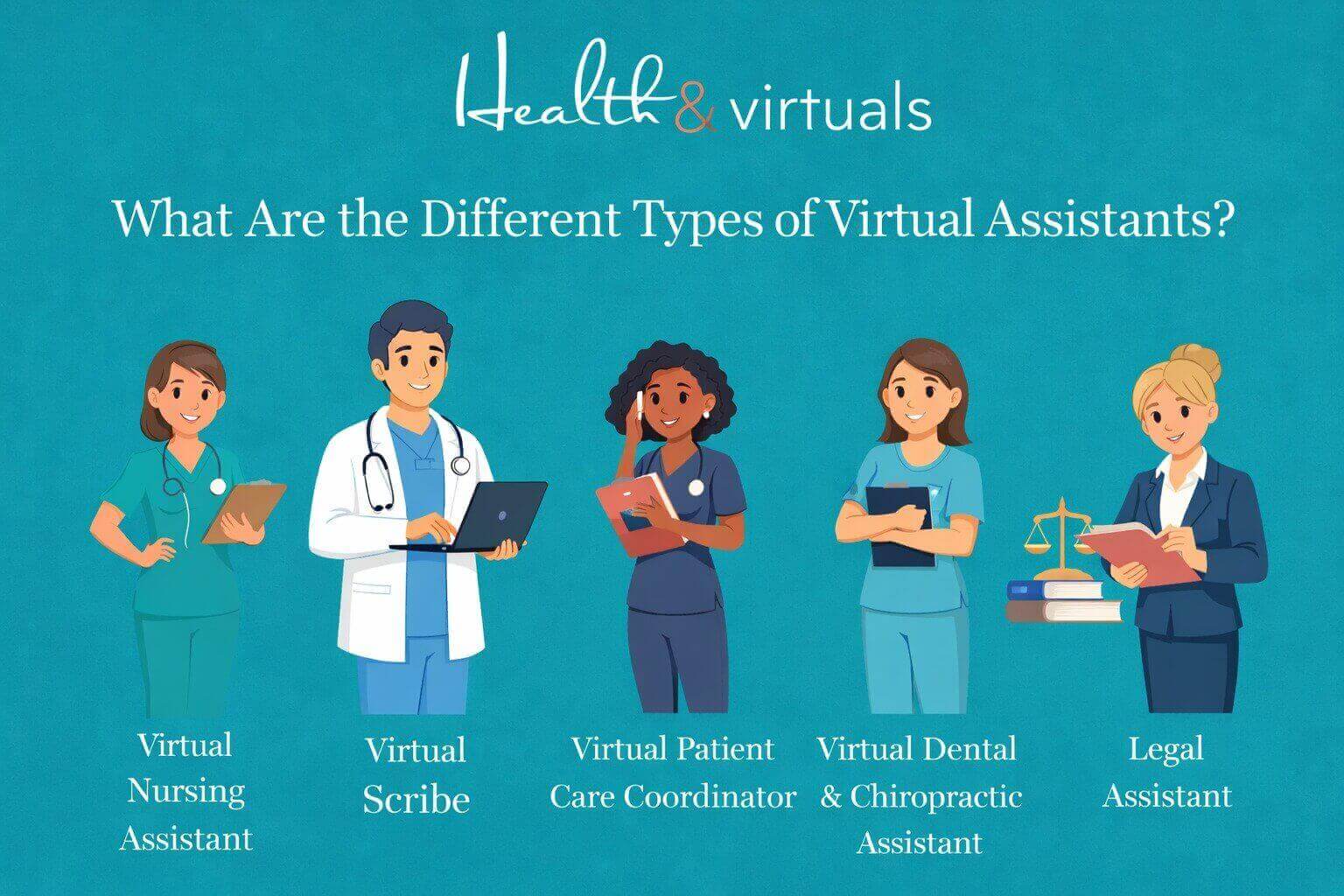
There are also some specialized roles that fall under the umbrella of healthcare VAs, or virtual medical assistants.

These include:

→ Virtual Medical Assistants. VMAs handle administrative and clinical support tasks. Includes scheduling, patient intake, and basic care coordination.

→ Virtual Scribes. To document patient encounters in real time, you may benefit from the help of Virtual scribes. Trained in updating medical records accurately during or after consultations.

→ Virtual Patient Care Coordinators. Manage patient communication. Patient care coordinators remotely follow up and create care plans to ensure a smooth treatment journey.

→ Virtual Dental & Chiropractic Assistants. To support dental and chiropractic practices, you need virtual dental assistants and virtual chiropractic assistants… niche-specific, trained with scheduling, patient records, billing, and front-desk coordination.

→ Virtual Medical Billing Coordinators. Process claims. Manage your RCM & manage insurance verifications. Virtual billing specialists ensure accurate and timely medical billing for better revenue.

→ Virtual Nursing Assistants. As Family Nurse Practitioners (FNPs) and Psychiatric Mental Health Nurse Practitioners (PMHNPs), support nurses and care teams by monitoring patient updates, coordinating care tasks, assisting with documentation, and ensuring continuity of care.

What are VMAs Best For?

  • Medical clinics and hospitals.
  • Telehealth providers.
  • Mental health practices.
  • Dental and chiropractic clinics.
  • Assisted living and nursing homes.

2. Administrative Virtual Assistant

Virtual staffing for business growth i, lady working from different time xone

The backbone of your daily operations. Your Virtual Administrative support helps keep your business organized, on track, and running smoothly.

Tasks of Administrative Remote Staff

  • Managing emails, inbox organization, and follow-ups.
  • Calendar scheduling, appointment coordination, and reminders.
  • Data entry, file management, and documentation.
  • Preparing reports, presentations, and spreadsheets.
  • Handling travel arrangements and meeting coordination.
  • CRM updates and database management.

Other specialized roles of administrative remote staff, such as:

→ Virtual Legal Assistant. Prepares legal documents and manages case files. Your VLAs will help to schedule hearings. They’re qualified and trained to support attorneys with research and documentation

→ Virtual HR Assistant. They are needed to handle recruitment support. Communicate with talent pool, onboarding/offboarding, and employee records. HR assistants remote are trained to work remotely with internal HR coordination.

→ Virtual Payroll Assistant. Manages timesheets and processes payroll data. Remote Payroll assistants track compensation and ensure accurate payments, keeping all work aligned and timely.

→ Virtual Executive Assistant. Your virtual executive assistant provides high-level support, including calendar control, strategic coordination, and confidential communication

→ Virtual Medical Billing Coordinator. A billing coordinator is one who remotely manages billing records, insurance documentation, claims processing, and payment tracking, in coordination with the medical billing team of any practice.

→ Virtual Sales Development Representative (SDR). Generates and qualifies leads. SDR conducts outreach (email/calls), schedules sales meetings, and supports pipeline growth, supporting your business.

What are Virtual Administrative Assistants Best for?

  • Startups and small businesses.
  • Legal firms and corporate teams.
  • Healthcare practices and clinics’ medical billing team.
  • Agencies and growing organizations need structured support.
  • Any business needing daily operational support

3. Customer Support Virtual Assistant

Remote professionals working from different locations worldwide

Your frontline support system, Virtual customer support assistants, ensures every customer interaction is handled professionally and efficiently.

Tasks of Customer Support Virtual Assistants

  • Managing support tickets and helpdesk systems.
  • Handling complaints, refunds, and issue resolution.
  • Order tracking and service follow-ups.
  • Maintaining customer satisfaction and retention.

What are Customer Support Virtual Assistants Best for?

  • E-commerce brands.
  • SaaS companies.
  • Service-based businesses, such as a virtual wellness assistant for a wellness clinic.
  • Subscription-based platforms.

4. Marketing Virtual Assistant

Hospitality virtual assistant responding to guest inquiries through live chatDriving visibility, engagement, and growth. Marketing VAs through strategic digital marketing support help with the growth of your business.



Tasks of Marketing Virtual Assistant

  • Email marketing campaigns and automation.
  • SEO optimization and keyword research.
  • Social media strategy and content planning.
  • Lead generation and funnel management.
  • Analytics tracking and performance reporting.
  • Blog publishing and content optimization.

What are Marketing Virtual Assistants Best For?

  • Digital agencies.
  • Online businesses.
  • Personal brands.
  • Clinics.
  • Wellness businesses: growing online presence.
  • Dental setups.
  • Nursing Homes.
  • Psychiatric facilities.

5. Executive Virtual Assistant

Virtual assistant providing 24/7 support for hotel guests online

Executive VAs are providing high-level support for leadership. Helping you stay focused on strategy while managing the details.

Tasks of Executive Virtual Assistants

  • Managing high-level schedules and priorities.
  • Handling confidential communication.
  • Business coordination and stakeholder management.
  • Project tracking and internal operations support.
  • Preparing business reports and insights.

Who are Executive Virtual Assistants Best For?

  • CEOs and founders.
  • Senior executives.
  • Scaling companies.
  • Legal firms (as Virtual Legal Assistant)>

6. E-commerce Virtual Assistant

Illustration about e commerce virtual assistant help with online setups

If you want to keep your online store running efficiently, from product listings to customer experience, you will need an e-commerce virtual assistant.

Tasks of E-commerce Virtual Assistants

  • Product listing and optimization (Shopify, Amazon, etc.)
  • Inventory tracking and order management.
  • Customer support and returns handling.
  • Supplier coordination and logistics support.
  • Product research and competitor analysis.

What are E-commerce Virtual Assistants Best For?

  • Shopify store owners.
  • Amazon sellers.
  • Dropshipping businesses.
  • Online entrepreneurs.

How to Choose the Right Virtual Assistant for Your Business?

When hiring a virtual assistant, consider the following:

1. Identify Your Needs

Are you looking for general support or specialized expertise? 

Clearly identify which role is most needed to support your business. Discuss with your team. 


If you are opting to hire a virtual assistant from a remote staffing company (MOST RECOMMENDED!!!), Health & Virtuals can provide you with a consultation. Share your requirement with us. We will guide you on what is best for your business!


2. Define Your Budget

Different types of VAs come at different price points. Again. Discussion with our expert support team can be the best option for you!

3. Check Experience

Look for industry-specific experience. Before finalizing your online VA, know in detail about its experience. The more industry-specific experience and training a VA has, the more it will be specialized to meet your requirements and business growth.

4. Decide Between Freelancer or Agency

VAs are available as freelancers. But a virtual assistant agency offers reliability and scalability. They provide background-checked, pre-vetted & trained pupils. Saving a lot of your time on training and onboarding a remote candidate. While freelancers may be more budget-friendly.


Which Type of Virtual Assistant Is Right for You?

The right choice depends on your business goals and operational gaps.

→ You need an Administrative Virtual Assistant!virtual assistant nurse helping patient queries online

Is your business is suffering from:

  • Inbox and email management overload?
  • Calendar conflicts and missed appointments?
  • Disorganized files, documents, and CRM data?
  • Repetitive admin tasks taking up your time?
  • Need for structured daily workflow support?
  • Lack of internal coordination between tasks and teams?


→ You need a Healthcare Virtual Assistant

Is your healthcare practice facing:

illustration Healthcare team benefiting from virtual billing assistant with improved revenue and reduced workload

  • Patient scheduling and appointment management overload?
  • High volume of missed calls and unanswered patient inquiries?
  • Medical billing, insurance verification, and claims processing delays?
  • EMR/EHR documentation burden affecting staff productivity?
  • Inefficient patient follow-ups and care coordination gaps?
  • Compliance challenges and administrative workload in daily operations?
  • Lack of structured support for front desk and back-office tasks?
  • Difficulty managing intake forms, records, and patient communication?

Hire now!


  • If your nursing team is overloaded with administrative work, patient documentation, scheduling, and non-clinical tasks affecting care delivery. → You should hire a Virtual Nursing Assistant.
  • If your physicians are spending too much time on documentation, note-taking, and medical record updates instead of patient care. You need to hire a Virtual Scribe.
  • If your practice is struggling with poor patient follow-ups and care coordination gaps. Weak patient engagement is affecting the treatment journey badly. → You need a Virtual Patient Care Coordinator.
  • If your dental or chiropractic clinic is facing missed appointments, front desk overload, disorganized records, and weak follow-up systems. → You need a Virtual Dental & Chiropractic Assistant..
  • If your healthcare billing process is slowed by claim delays, insurance issues, coding errors, and inefficient revenue tracking. → You need a Virtual Medical Billing Coordinator.
  • If your clinic or hospital is struggling with appointment overload. There are scheduling conflicts and inefficient calendar management across multiple providers. → You need a Virtual Scheduler.
  • If your physicians or clinical teams need support with clinical coordination. With patient preparation, documentation assistance, and workflow support. → You need a Virtual Physician Assistant.

→ You need a Marketing or Social Media Virtual Assistant

Is your business suffering from:Remote virtual hr assistant scheduling patient appointments and updating electronic health records from a home office workspace.

  • Low online visibility and weak brand presence?
  • Inconsistent social media posting?
  • Poor engagement and audience growth?
  • Lack of SEO strategy and content planning?
  • Weak lead generation from digital channels?
  • No time to manage marketing activities?

Hire with Health & Virtuals!


→ You need a Sales Development Representative (SDR) Virtual AssistantRemote wellness assistant sending appointment reminders and follow-up messages to improve patient engagement and treatment adherence.

Is your business suffering from:

  • No structured lead generation system?
  • Missed follow-ups with potential clients?Low conversion from inquiries to sales?
  • Poor CRM tracking and pipeline manaement?
  • Lack of consistent outreach activity?
  • Sales team overloaded with non-sales tasks?

→ You need a Legal Virtual AssistantLaw firm team collaborating with virtual legal assistants through online meeting platform

Is your legal practice struggling with:

  • Time-consuming case file management and documentation overload?
  • Missed deadlines for filings, hearings, and court schedules?
  • Excessive administrative workload taking time away from client work?
  • Disorganized contracts, agreements, and legal records?
  • Difficulty managing client communication and follow-ups?
  • Inefficient coordination between attorneys, paralegals, and clients?
  • High volume of repetitive legal research and paperwork?

Hire a Online VA Legal Support!


→ You need a Hospitality Virtual AssistantVirtual hospitality assistant managing hotel guest communication remotely

Is your hospitality business struggling with:

  • High volume of guest inquiries, bookings, and reservation management overload?
  • Missed check-in/check-out coordination and scheduling conflicts?
  • Excessive administrative workload affecting guest experience quality?
  • Disorganized guest records, preferences, and booking details?
  • Difficulty managing guest communication and timely responses?
  • Inefficient coordination between front desk, housekeeping, and service teams?
  • Repetitive operational tasks affecting staff productivity and service speed?

Need one? Hire now!


Pros of Hiring the Right Virtual Assistant

There are lots of benefits your business or healthcare facility will enjoy with VAs.

It includes:

  • Cost savings with no office space or employee benefits required.
  • Increased productivity through efficient task delegation.
  • Access to a global talent pool with diverse skill sets.
  • Easy scalability as your business grows or workload increases.
  • Improved work-life balance by reducing operational burden.

Do Not Make These Mistakes While Hiring a Virtual Assistant for Your Business!

  • Not defining clear tasks and expectations from the start.
  • Hiring based only on cost instead of skills and experience.
  • Ignoring communication skills and responsiveness.
  • Skipping trial periods to test performance and fit.
  • Not using proper tools, systems, or workflows for collaboration.

Ready to Strengthen Your Healthcare Operations?

Health & Virtuals is the best remote staffing company in the United States! Here, we don’t just provide virtual assistants. We deliver trained, reliable healthcare support professionals who integrate seamlessly into your workflow. To improve operational efficiency from day one.

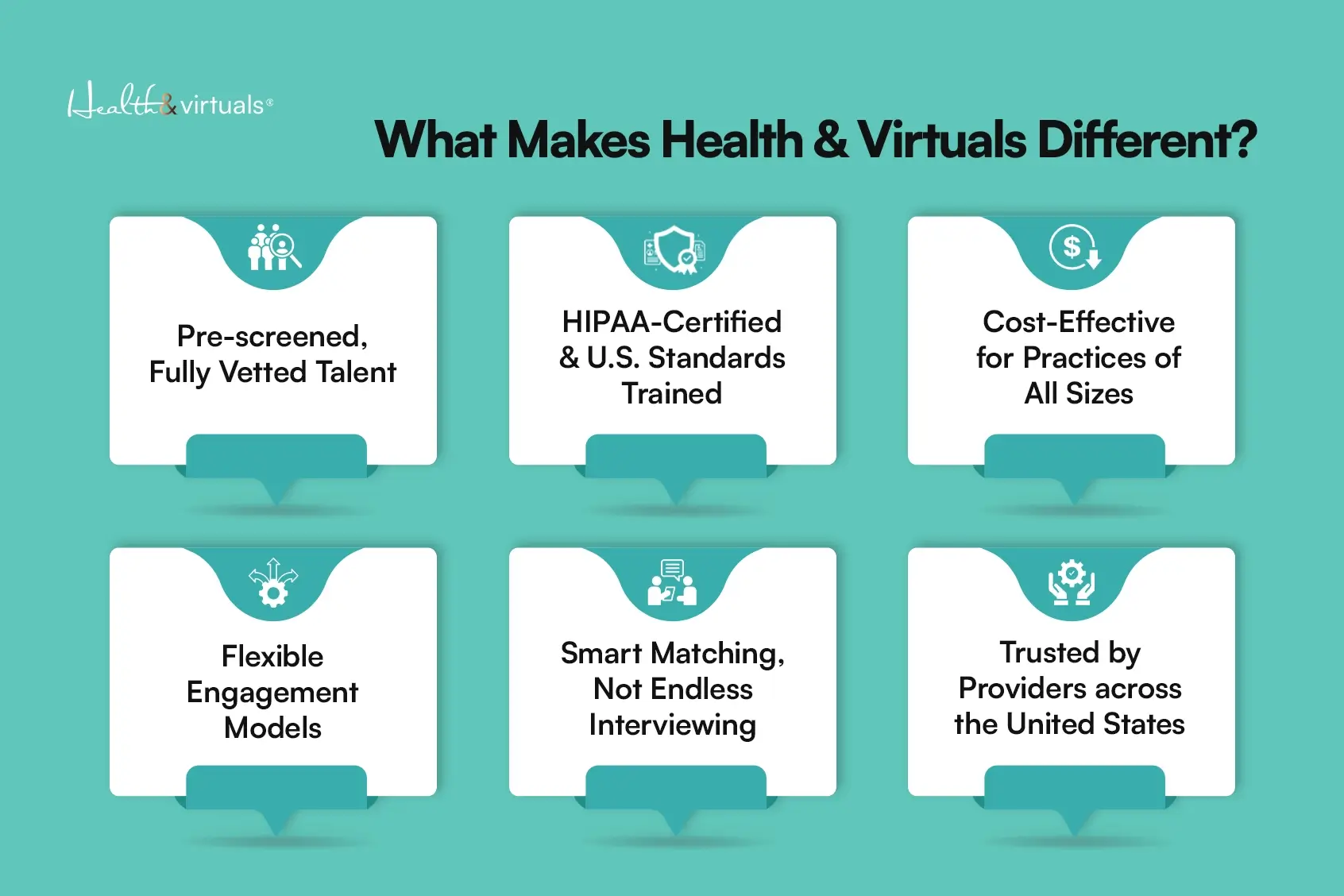
what makes health and virtuals different copy (1)

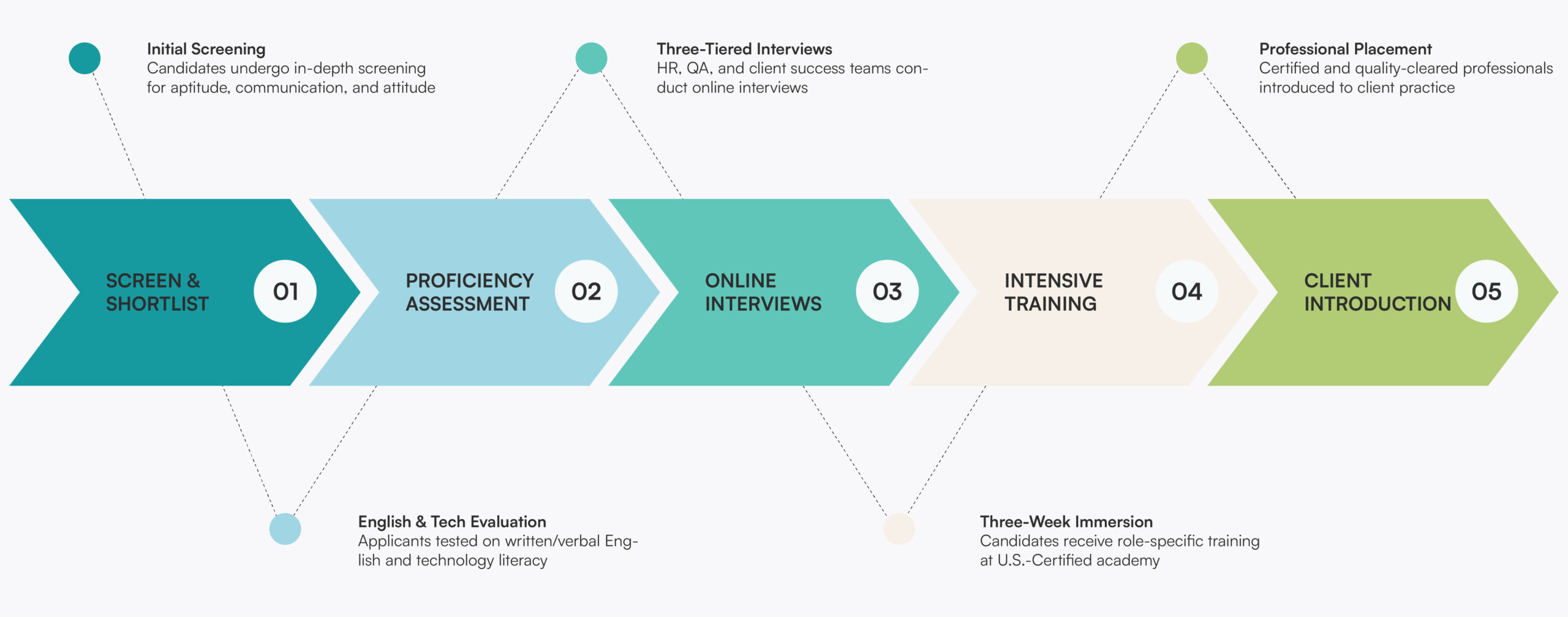
→ Our candidates are vetted, pre-screened, and highly qualified through a structured selection process.

→ Every professional is trained in our specialized digital training programs to ensure industry-ready performance.

→ We are committed to delivering excellent, consistent, and reliable niche in Virtual Assistant support services for healthcare and other businesses of all sizes.

→ Our team is HIPAA-trained for handling medical, administrative, and patient coordination tasks with accuracy and care.

→ We provide scalable staffing solutions across all states for firms & healthcare facilities nationwide.

→ We ensure HIPAA-aware, process-driven, and patient-focused virtual support for your practice.


Remote virtual assistant working on laptop managing business tasks online from home office, overlapping illustration about increases ROI


Partner with Health & Virtuals today. Get a quote! And build a stronger, more efficient workflow system with the right online virtual assistant support team.


FAQs

What are the different types of virtual assistants?

There are several types, including administrative, marketing, customer support, healthcare, e-commerce, legal, and executive virtual assistants.

Can I hire a VA for a specific task only?

Yes. Many businesses hire VAs for specific tasks. They include social media management, data entry, or seasonal customer support without long-term commitments.

How quickly can I hire a virtual assistant?

You can typically hire a VA within a few days through our virtual assistant agency. Depending on your requirements and the level of expertise needed.

16Apr

How to Choose the Right Virtual Assistant for Your Business?

Modern businesses are no longer limited by geography. Nor do the office walls or traditional staffing models stop them anymore… Businesses worldwide are rapidly shifting. Opting toward flexible and remote workforce models. With studies showing that over 70% of companies now rely on remote professionals in some capacity. 

While a 2025 analysis by Upwork shares that 37% of companies are already fully remote. Adding to it, in the next 5 years, 28% more expect to be fully remote. 

So, following the trend, the global demand for a virtual assistant (VA) continues to grow. As organizations seek cost-effective ways to manage their operations. To reduce overhead expenses and access specialized talent without geographical limitations. 

Well, for many startups and growing companies, leveraging an online virtual assistant has become a strategic move. It is to stay competitive in an increasingly digital economy.

However, hiring a virtual assistant is not simply about delegating tasks.. It’s about choosing the right professional. The one suits best and aligns with your workflows, your communication style, and long-term business objectives. 

Learn how to choose the right virtual assistant for your business…


What Is a Virtual Assistant?

illustration Healthcare team benefiting from virtual billing assistant with improved revenue and reduced workload

A virtual assistant, or simply called a VA, is a remote professional. These remote professionals provide administrative, technical, or creative support to all types and sizes of businesses. 

They are unlike in-house employees; an online virtual assistant works remotely, not in your office space. They are often hired through a virtual assistant agency or as freelancers.

Virtual assistants can handle a wide range of business-critical tasks. Across multiple functions, including:

1. Administrative Support

  • Email management and inbox organization.
  • Calendar scheduling and appointment setting.
  • Data entry and database management.
  • Document preparation and file organization.

2. Specialized Industry Support

3. Customer Support

  • Responding to customer inquiries via email, chat, or phone.
  • Handling complaints and support tickets.
  • Managing CRM systems and customer records.

4. Social Media Management

  • Content scheduling and posting.
  • Audience engagement and message responses.
  • Analytics tracking and performance reporting.

5. Content Creation and SEO

  • Blog writing and article creation.
  • Website content updates.
  • Keyword research and on-page SEO optimization.

6. HR, Finance & Bookkeeping

This versatility makes them a valuable asset for businesses. Virtual assistants (VA) are proven to be helpful for firms, looking to cut costs, streamline operations & improve efficiency.


Why Hiring the Right Virtual Assistant Matters?

Digital hospitality management system improves guest service efficiency and profit your hotel business.

Choosing & hiring the right virtual assistant for your business is critical. 

Why? Because they become an extension of your operations.

A skilled VA can:

  • Improve efficiency and workflow.
  • Reduce operational costs.
  • Increase scalability.
  • Allow you to focus on core business functions.
Business Area Impact of the Right Virtual Assistant Risk of the Wrong Hire
Operational Efficiency Streamlines workflows and reduces bottlenecks Creates confusion and slows processes
Cost Management Reduces overhead and avoids rework costs Leads to wasted budget and repeated hiring
Productivity Frees up time for core business activities Increases workload due to errors and follow-ups
Revenue Growth Allows focus on sales and strategy Distracts from revenue-generating tasks
Scalability Enables flexible and fast business growth Limits growth due to inefficiencies
Communication Ensures clear, timely coordination Causes delays and misunderstandings
Quality Control Maintains consistent and accurate output Results in poor-quality work and client dissatisfaction

Step-by-Step Guide to Choosing the Right Virtual Assistant!

Virtual medical assistant using a laptop to schedule appointments and verify insurance remotely.

1. Identify Your Business Needs

You know your business, so start hiring the right VA by listing the tasks. Evaluate what tasks from your business you want to outsource. 

What are those? Are they repetitive administrative tasks or specialized roles like marketing or billing?

Clear goals help you find a VA with the right virtual assistant skills.

2. Define Your Budget

Costs vary. Depending on your experience, specialization, and location. 

Decide whether you need:

  • Entry-level support (lower cost).
  • Mid-level expertise.
  • Highly specialized professionals.

This will help you choose between freelancers and a virtual assistant staffing agency.

3. Choose the Right Type of Virtual Assistant

Selecting the right type of virtual assistant (VA) is essential. For achieving efficiency, accuracy, and real business impact.

Instead of hiring a generalist, align the VA’s role with your industry needs and operational priorities.

→ Hire a Virtual Executive Assistant (Core Business Support)Remote medical billing assistant using cloud-based software for claims processing and coding

A virtual executive assistant helps to manage routine operations and keep your business organized. Including:

  • Email and calendar management.
  • Data entry and record maintenance.
  • Document preparation and reporting.
  • Appointment scheduling and coordination.

→ Hire A Virtual Sales Development RepresentativeChiropractic patient receiving follow-up reminder call from virtual assistant

 A remote SDR is best for handling ongoing client or patient communication.

  • Responding to inquiries via email or chat.
  • Managing support tickets.
  • Handling follow-ups and confirmations.
  • Maintaining CRM records.

→ Hire a Medical Virtual AssistantNurse using laptop and headset for remote patient monitoring and EHR access

An MVA or a physician assistant providing specialized medical practice support is ideal for clinics, hospitals, and healthcare providers needing operational support.

  • Patient scheduling and appointment coordination.
  • Medical records management (EHR/EMR systems).
  • Insurance verification.
  • Patient communication and follow-ups.

→ Hire a Medical Billing Virtual Assistant

Virtual scribe, virtual medical scheduler & remote billing coordinator can be hired for accurate and efficient revenue cycle management.

They can handle your:

  • Fast medical billing process with virtual assistant handling claims submission and follow-upsMedical coding (ICD-10, CPT, HCPCS) for accurate billing and documentation.
  • Medical billing and insurance claim preparation.
  • Submission, tracking, and follow-up of insurance claims.
  • Payment posting and account reconciliation.
  • Management of denied or rejected claims with proper resubmission.
  • Scheduling and managing patient appointments and physician calendars.
  • Handling patient communication, reminders, and follow-ups.
  • Updating and maintaining Electronic Health Records (EHR/EMR systems).
  • Real-time or post-visit clinical documentation support (virtual scribing).
  • Ensuring compliance with healthcare and insurance regulations.

→ Hire a Virtual Nurse Assistant (Clinical Support Role)virtual assistant nurse helping patient queries online

Hiring a Virtual Nurse Assistant is best suited for healthcare organizations needing clinical-level assistance remotely.

  • Patient triage support (non-diagnostic).
  • Care coordination and follow-ups.
  • Remote patient monitoring assistance.
  • Documentation support for healthcare providers.

→ Hire a Legal Virtual AssistantLegal documents and contracts being prepared by virtual legal assistant services

Remote legal support is essential for law firms and legal professionals if they require structured support for:

  • Legal document drafting and formatting.
  • Case research and file organization.
  • Scheduling client meetings.
  • Managing legal documentation and compliance records.

→ Hire an HR & Payroll Virtual Assistant

Remote HR Assistants: Scale Smarter with the Right HR Recruitment Agency

Your Hr assistant remote can be useful for maintaining financial accuracy and tracking.

  • Invoice generation and payment tracking.
  • Expense management.
  • Payroll & HR data entry and reporting.
  • Account reconciliation support.

→ Hire a Technical Virtual Assistantvirtual medical assistant attending meeting

Best for handling systems, tools, and backend processes.

Including:

  • Website maintenance and updates.
  • CRM setup and management.
  • Workflow automation.
  • Software troubleshooting.

→ Hire a Hospitality Virtual Assistant

Professional virtual legal assistant handling legal documents and client communication using a laptop remotely.Your virtual hospitality assistant is Ideal for hotels, travel agencies, and service-based businesses. They can help with:

  • Booking and reservation management.
  • Guest communication and confirmations.
  • Itinerary planning and coordination.
  • Handling customer queries and service requests.

When hiring a virtual assistant, focus on role-specific expertise… rather than general skills.

A specialized virtual assistant for business, especially in healthcare, legal, or hospitality… ensures higher accuracy, compliance, and operational efficiency.

4. Look for Relevant Skills and Experience

Evaluate candidates based on:

  • Previous work experience.
  • Industry knowledge.
  • Portfolio or case studies.

A qualified remote virtual assistant should align with your business niche.

5. Assess Communication Skills

Strong communication is essential when working remotely. If you want to hire a Virtual assistant for your business, look for:

  • Clear written communication.
  • Prompt responses.
  • Ability to understand instructions.

Miscommunication can quickly lead to errors and delays.

6. Check Tools and Technical Knowledge

Your VA should be familiar with tools such as:

  • Project management tools (Trello, Asana).
  • Communication platforms (Slack, Zoom).
  • CRM systems.
  • Microsoft Office or Google Workspace.

Why? Because technical proficiency is a key part of modern virtual assistant skills.

7. Conduct Interviews and Test Tasks

Don’t rely solely on resumes. You should:

  • Conduct structured interviews.
  • Assign a small paid/unpaid test task.

This helps you evaluate real-world performance.

Or look for the best candidate from a virtual assistant staffing agency or remote talent staffing agency, such as Health & Virtuals, as they provide pre-vetted, qualified, trained, and fit-to-perform candidates for your business. 

8. Start with a Trial Period

If hiring yourself, before a long-term commitment, test the collaboration with a short trial. This reduces risk and ensures compatibility.

9. Recognise Your Own Delegation Challenges

Many business owners struggle to delegate effectively.

  • Be clear with instructions.
  • Set expectations.
  • Provide feedback.

Your success with a virtual assistant for business depends on how well you manage the relationship.


Key Qualities of a Great Virtual Assistant

A high-performing online virtual assistant is not just task-oriented. But brings a combination of technical, behavioral, and business skills. Those skills directly impact productivity, efficiency, and reliability.

They should have:

→ Strong Organizational Skills

  • Ability to manage multiple tasks, deadlines, and priorities efficiently.
  • Systematic handling of emails, files, schedules, and workflows.
  • Keeps business operations structured and well-documented.
  • Ensures nothing falls through the cracks in daily operations.

→ Reliability and Accountability

  • Consistently delivers work on time. NO constant follow-ups.
  • Takes ownership of assigned tasks and outcomes.
  • Maintains professionalism. In meeting deadlines and expectations.
  • Builds trust through consistent performance.

→ Proactive Problem-Solving Ability

  • Identifies issues before they escalate into major problems.
  • Suggests better workflows or process improvements.
  • Handles unexpected tasks with minimal supervision.
  • Thinks independently. Instead of waiting for instructions.

→ Adaptability and Flexibility

  • Quickly learns new tools. Systems and business processes.
  • Adjusts to changing priorities and workloads.
  • Comfortable working across different industries or roles.
  • Adapts communication style based on client needs.

→ Advanced Time Management Skills

  • Prioritizes tasks based on urgency and importance.
  • Manages multiple clients or projects efficiently.
  • Avoids delays through structured planning.
  • Ensures consistent productivity throughout working hours.

→ High Attention to Detail

  • Ensures accuracy.In data entry, documentation, and reporting.
  • Spot errors in communication, billing, or scheduling.
  • Maintains high-quality standards in all deliverables.
  • Reduces costly mistakes in business operations/

→ Strong Communication Skills

  • Clear and professional written communication (emails, reports, messages).
  • Ability to understand instructions accurately.
  • Provides timely updates and progress reports.
  • Maintains smooth coordination with teams and clients.

→ Technical Proficiency

  • Familiarity with tools like CRMs, project management software, and cloud systems..
  • Ability to learn new platforms quickly.
  • Comfortable handling digital workflows and automation tools.
  • Basic troubleshooting skills for common technical issues.

Common Mistakes to Avoid While Hiring Virtual Assistants!

Avoid these pitfalls when hiring a virtual assistant:

  • Not defining tasks clearly.
  • Choosing based solely on low cost.
  • Skipping the interview process.
  • Ignoring communication skills.
  • Not using contracts or agreements.
  • Failing to provide onboarding or training.

These mistakes can lead to poor performance and frustration…


How Much Does a Virtual Assistant Cost?

The cost of a virtual assistant (VA) depends on several factors:

→ Experience Level

  • Beginner: $5–$10/hour
  • Intermediate: $10–$25/hour
  • Expert: $25–$60+/hour

→ Type of Work

Specialized services (e.g., medical billing, legal support) cost more.

→ Hiring Model

  • Freelancers (flexible, cost-effective)
  • Virtual assistant agency (more structured, higher cost, but reliable)

Hiring with a virtual assistant staffing agency is a better option as they provide vetted professionals, reducing hiring risks.


Benefits of Hiring a Virtual Assistant

The following are some of the benefits of hiring a VA for your business:

→ Significant cost savings. Businesses can reduce operational costs by up to 60 to 80%.. When compared to hiring full-time in-house staff. It is done mainly by eliminating office space, benefits, and overhead expenses.

→ Higher productivity levels. Companies using virtual assistants report an average 13–28% increase in overall productivity. Especially in administrative and repetitive tasks.

→ Time savings for business owners. Entrepreneurs save around 15+ hours per week. All by delegating tasks such as email management, scheduling, and data entry.

→ Improved business efficiency. Organizations report up to 35% improvement in workflow efficiency. It when virtual assistants manage routine operations and support systems.

→ Faster task completion. VA-supported teams complete tasks significantly faster. With studies showing up to 1.5x–2x faster turnaround. When compared to traditional in-house admin teams.

→ Better focus on core business growth. By outsourcing repetitive work, business owners can focus on strategy. Focused client acquisition and revenue-generating activities directly improve business growth potential.

→ Access to a global talent pool. Hiring a remote virtual assistant allows businesses to access skilled professionals worldwide. This without geographic limitations. Improving hiring quality and flexibility.

→ Scalability and flexibility. Businesses can easily scale support up or down with VAs. Based on workload without long-term employment commitments. Making it ideal for startups and growing companies.

→ Higher client satisfaction. They offer faster responses, organized systems, and consistent communication. Improve customer experience and retention rates.

→ Reduced employee burnout. Delegating workload to a virtual assistant for business reduces pressure on core teams, improving morale and long-term productivity.


Hire the Best Virtual Assistants with Health & Virtuals!

Virtual staffing for business growth i, lady working from different time xone

If you want reliability and quality, partnering with a trusted virtual assistant agency like Health & Virtuals can make a significant difference.

They specialize in matching businesses with skilled professionals tailored to specific industries and business needs.


What Types of Virtual Assistants Does Health & Virtuals Provide?

Health & Virtuals offers a wide range of services, including:

  • Administrative virtual assistants
  • Medical and healthcare VAs
  • Virtual Nursing Support
  • Virtual Wellness 7 Chiropractic Assistant
  • Legal virtual assistants
  • Customer support specialists
  • Digital marketing assistants
  • Billing and coding experts
  • HR & Payroll Assistants
  • Sales Development Representatives
  • Virtual Hospitality Assistants

Our structured hiring process ensures you get a qualified virtual assistant for business without the hassle.

Choosing the right virtual assistant can transform your business operations, reduce workload, and accelerate growth. 

Whether you need basic administrative support or specialized expertise, the right VA is a strategic asset.


Happy chiropractic patient receiving seamless communication and care support by virtual chiropractic assistantReady to scale your business?

Partner with Health & Virtuals today, share your requirements, and get your quote! and find the perfect remote virtual assistant for your business’s needs.


FAQs

How do I know if I need a virtual assistant?

If you’re overwhelmed with repetitive tasks, missing deadlines, or unable to focus on growth, it’s time to consider hiring a virtual assistant.

Should I hire a full-time or part-time virtual assistant?

It depends on your workload.

  • Part-time is ideal for small or growing businesses.
  • Full-time is suitable for ongoing, high-volume tasks.

How do I ensure quality work from a VA?

To maintain high-quality output:

  • Set clear expectations.
  • Use project management tools.
  • Provide regular feedback.
  • Start with a trial period.
19Dec

Remote Medical Talent in U.S. Healthcare: Challenges, Benefits & Trends 

None of the workforce shortages in the US were documented as closely as these. A recent AAMC study projects that by 2034, the US will lack 124,000 physicians, as well as numerous other nurses, allied health professionals, behavioral health, administrative support, and healthcare technology positions.   

This isn’t just a shortage of staff within the walls of the healthcare facilities… 

There is a shortage of staff to help manage the care and treatment of people. There is a shortage of healthcare workers who help with the administrative and operational functioning of the care systems. 

staff shortage can affect whole healthcare esystem

Fortunately, this is also where healthcare organizations are innovating. Virtual healthcare professionals support administrative and operational tasks from anywhere in the world. Remote clinical staff have a real positive impact through the support and clinical tasks they perform… 

Now, the staffing of healthcare facilities is no longer the only focus of operational healthcare staffing. The growing use of remote healthcare professionals is a workforce strategy to support the adaptability and competitiveness of primary facilities and healthcare systems overall. 


What are the Health System Challenges in the United States? 


 Key Challenges the US Healthcare Facing Today!

Below are the major problems faced by the US healthcare system due to the talent crisis in the healthcare field:

1. Growing Deficiency of Healthcare Employees: The lack of healthcare staff is evident in all fields of healthcare: 

→ Nursing: The American Association of Colleges of Nursing (AACN) reports that the field is expected to lose over 1 million nurses by the year 2030 because of retirement. 

→ Physician: There is a shortage in primary care, internal medicine, psychiatry, etc, due to the retiring workforce and the age demographic of the population. 

→ Allied Health Labor: There is a great deficiency amongst radiology, laboratory technicians, medical assistants, and pharmacy technicians. 

→ Administrative and Support Positions: These positions include medical billing, coding, patient coordination, revenue cycle management, and scheduling, and all of these are experiencing a high turnover. 

The gaps in staffing create operational bottlenecks. This leads to delays in healthcare provision and results in increased burnout of the staff.

2. Healthcare Staff Costs: Healthcare labor costs have been increasing rapidly every year since 2020. Many companies can no longer afford traditional staffing models of in-area hiring, travel nurses, and temporary contracts.

3. Staff Jump: Staff turnover and burnout are driven and increased by excessive amounts of work, overwhelming paperwork, and too little ongoing support. Physicians have to deal with stacks of paperwork, resulting in more than 35% of their time spent on documentation rather than seeing patients.

decrease care standards due to staff shortage4. Rural Healthcare Gaps: There is a shortage of specialists and core health services in many rural and underserved regions of the United States, which creates and worsens health inequities.

5. Inefficient Talent Pipelines: Recruiting, onboarding, and training new staff is extremely time-consuming, and large health systems combined with remote telehealth environments make the telehealth remote staff retention and staffing problem even more complex. 

The remote telehealth provider personnel’s primary staffing management system is directly responding to and solving these major healthcare telehealth staffing management system challenges. 


How Remote Medical Staffing Addresses These Challenges? 

virtual medical assistant checking some documents while working remotely

Remote talent acquisition enables healthcare organizations to tap into a broader pool of talent, regardless of remote location restrictions.  

Here is how it solves the most relevant issues:

Increasing Availability of Global Talent

Remote staffing allows organizations to engage with new talent from all over the world, therefore having access to the best medical, administrative, and technical expertise continuously, especially when there are no local resources.

Significant Cost Saving 

Remote employees reduce staffing costs by 50–70% compared to in-house roles. Organizations eliminate underutilized overhead costs associated with: 

  • Workplace 
  • Employee benefits and health insurance 
  • Hiring and training new employees 
  • Agency costs and markup for temporary workers 

Such cost advantages provide access to well-staffed staffing for even smaller healthcare organizations.

Less Administrative Work for Providers

Remote healthcare professionals can provide support for: 

  • Patient intake and appointments 

This can help providers focus more on healthcare and reduce documentation.

Increases Flexibility of Workforce 

Remote employees can be added or removed from the team based on the number of patients seen, the time of year, or new types of services offered, eliminating the headaches of standard recruitment processes every time there is a need for change.

virtual dental assistant helping patient online related to dental queries

Improved Access To Healthcare And Patient Satisfaction 

Remote staff allows healthcare organizations to provide: 

  • Communication with patients at any time, day or night… 
  • Appointment scheduling that is more efficient and quicker! 
  • Better processes for telehealth services. 
  • Faster care and assistance after the patient sees a healthcare provider.
  • More patient satisfaction and more positive healthcare outcomes. 

What are the Benefits of Hiring a Remote Medical Workforce? 

Remote healthcare professionals assisting through remote staffing

There are many benefits you will get when you hire a remote talent for your practice. You will get: 

  • Cost savings on labor. 
  • Increased efficiency of operations. 
  • Less time spent on administrative tasks. 
  • Improved quality of documentation and compliance. 
  • Increased patient engagement and retention. 
  • Access to various and hard-to-find skills. 
  • Service diversification without the need for additional physical infrastructure. 

→ Advantages of remote support for Doctors, Nurses & Medical Practitioners 

  • Lower documentation demand. 
  • Increased patient interaction. 
  • Improved balance between work life and personal life. 
  • Inclusion of virtual assistants and clinical scribes in daily practice. 
  • Decreased stress and increased levels of burnout. 
  • Assistance with telehealth workflows. 

The Future of Healthcare Staffing in the United States of America!

Healthcare staffing in the United States of America is expected to remain hybrid and digitally global with the following trends: 

After the emergence of virtual-ready healthcare positions, the following positions are mostly modified to fit remote work: 

  • Billers & Medical Coders 
  • Medical Assistants 
  • Customer Service for Healthcare 
  • Clinical Scribing 
  • Data Analysts 
  • Coordinators for Remote Healthcare 

Hire talented, highly-qualified, and trained remote staff with Health & Virtuals. Ready to work with you from day one! 


Health & Virtuals: Best Remote Healthcare Talent Staffing Company!

HIPAA-certified virtual medical assistant happily available for patients to answer any queries

Our organization has the most extensive and adaptable healthcare staffing solutions available in the industry. 

We provide highly-trained, qualified, global staff to United States healthcare practices, on demand. Our services include: 

Remote Clinical Support Staffing:

  • Virtual medical assistants 
  • Clinical scribes 
  • Telehealth nurses 
  • Billing coordinators 
  • Patient follow-up specialists 

Administrative & Back-Office Staffing 

  • Medical billing & coding 
  • Revenue cycle management 
  • Patient scheduling & intake 
  • Insurance verification 
  • Healthcare customer service 
  • Hr & Payroll Support 

All remote medical professionals have received training on HIPAA, contemporary healthcare technologies, EMR and EHR platforms, and standards in US healthcare. 


How Our Remote Medical Staffing Works? 

health and jobs digital excellence academy

Integration, support, and quality adaptability are assured through our processes. 

→ Discovery & Specification. We identify the needs in your staffing, such as role, specialty, hours, certification, and workflow. 

→ Talent Acquisition. We do talent acquisition for healthcare, and we train the highly-qualified staff. We offer to connect you to pre-qualified, remote medical professionals with the appropriate skill level needed for the jobs discussed. 

→ Integration & EMR training. Remote talent incorporation into your existing and current workflows, as well as training on your EMR/EHR, SOPs, and other communication flows, is our responsibility. 

→ Remote Medical Staffing Performance. We monitor key performance indicators relative to documentation, patient satisfaction, claim turnaround time, and overall productivity. 


Why Remote Medical Staffing Should Partner With Us! 

a group of medical practitionersSelecting the best remote staffing partner for your medical practice is a challenge. Here is what makes us stand out from the rest.

1. Healthcare Only! We are not a general outsourcing company. We focus our attention on healthcare-related staff.

2. Extremely Vetted Professionals. 

 All our staff have had the following done on their records: 

  • Background checks. 
  • Skill evaluations. 
  • HIPAA compliance training. 
  • Testing in medical terms. 
  • Assessed on their proficiency in EMR/EHR… 

3. Transparency Without Surprises. There are no hidden fees or agency markup costs on our services.

4. Full Adaptation To Your Workflow. We customize our services according to your convenience for the systems you have in place, business processes, and preferred methods of communication. 

5. Account Management. There is personalized service and a devoted team for ongoing assistance. 

6. Flexible, Reliable, and Scalable. We are able to meet any requirements you have, whether it is a single virtual medical assistant to a complete RCM remote team. We adjust to your staffing needs. 


Get Started: Build Your Remote Healthcare Team Today! 

what makes health and virtuals different copy (1)

How about solving staffing challenges and saving costs while improving efficiencies at the same time?  

The answer is simple- partnering with a professional remote medical staffing provider. 

World-class remote medical workers are ready and available to serve your practice at a much lower cost than in-house staffing. 


Contact Now! Build your virtual healthcare workforce today with Health & Virtuals . 


FAQs 

How do healthcare organizations get remote medical staff? 

They partner with a professional healthcare talent agency (like us!) that specializes in remote medical professionals’ healthcare screening, training, and deployment. 

How does remote medical staffing help in reducing healthcare costs? 

Over head costs and recruitment costs get eliminated with remote talent. Hired medical professionals deliver support at highly skilled levels, and costs are lowered. Anywhere from 30-70% vs. industry standards. 

How are your healthcare staffing services different? 

Exclusively healthcare remote staffing, strict vetting, HIPAA-compliance, transparent costing, and easy integration with your workflows. 

What are some of the healthcare positions that can be filled with your staffing services? 

We staff remote medical assistants, nurses for telehealth, clinical scribing, medical coding and billing, patient scheduling, revenue cycle management specialists, technology support teams, etc. 

Do your remote medical specialists know how to use the latest medical technology? 

Yes. All employees have training in current EMR/EHR systems, telehealth applications, compliance with US healthcare regulations, and AI device workflow management systems.